
Why Bring Your Own Model
Resume Matcher ships no AI model. You connect one yourself: a cloud provider you already hold a key for, a free model running on your own hardware, or a ChatGPT or Claude plan you already pay for. You pick the provider and the model, and with them the cost and where your resume text goes.
Supported Providers
| Provider | Type | Default model in Settings |
|---|---|---|
| OpenAI | Cloud | gpt-5-nano-2025-08-07 |
| Anthropic (Claude) | Cloud | claude-haiku-4-5-20251001 |
| Google Gemini | Cloud | gemini-3-flash-preview |
| DeepSeek | Cloud | deepseek-chat |
| OpenRouter | Cloud | deepseek/deepseek-chat |
| Groq | Cloud | llama-3.3-70b-versatile |
| Azure AI Foundry | Cloud | mistral-large-latest |
| Ollama | Local | gemma3:4b |
| OpenAI-compatible server (llama.cpp, vLLM, LM Studio) | Local | custom-model placeholder at http://localhost:8080/v1; replace both with your server’s values |
| ChatGPT plan (Sign in with ChatGPT) | Your ChatGPT plan | Chosen from your account’s models after you sign in |
| Claude plan (via Claude Code) | Your Claude plan | Claude Code’s own default model |
The default is a starting point. The model field is free text, so you can type any model name your provider offers. The two plan options need no API key and come with caveats; see Option C.
Option A: The Settings Page
- Open
http://localhost:3000/settings. - Pick your provider.
- Paste your API key. For Ollama or an OpenAI-compatible server, enter the server URL instead. For a ChatGPT or Claude plan, see Option C.
- Change the model name if you want a different one.
- To go through a proxy or aggregator endpoint, fill in Base URL. Leave it blank to use the provider’s default.
- Click Save, then Test Connection.
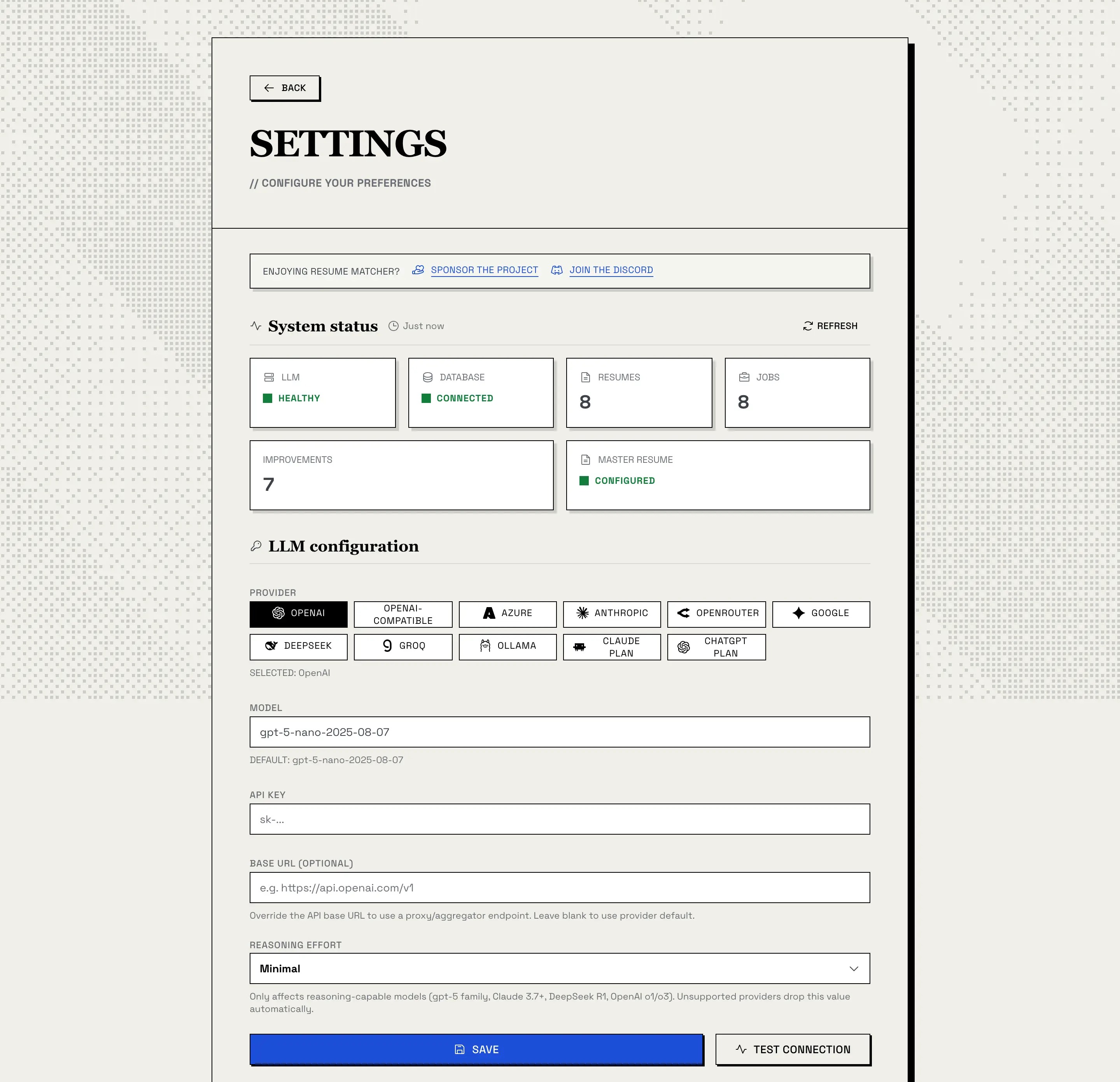
Test Connection sends the single word “Hi” to your provider and reports whether it answered. The System Status panel at the top of the page shows whether the LLM is healthy and the database is connected. Settings you save here take precedence over environment variables.
Each provider keeps its own saved key, so switching providers doesn’t erase the other one.
Reasoning effort. This setting only affects reasoning-capable models (the gpt-5 family, Claude 3.7+, DeepSeek R1, OpenAI o1/o3). Auto sends nothing and is the most compatible choice.
Option B: Environment Variables
Four variables configure the backend:
| Variable | What it sets |
|---|---|
LLM_PROVIDER |
One of openai, anthropic, gemini, deepseek, openrouter, groq, azure_foundry, ollama, openai_compatible, chatgpt, claude_cli |
LLM_MODEL |
The model name |
LLM_API_KEY |
Your provider key |
LLM_API_BASE |
Server URL, for Ollama and OpenAI-compatible servers |
For a local install, put them in apps/backend/.env. For Docker, pass them as container environment. The Docker image also reads Docker secrets: append _FILE to any of the four variables to load its value from a file, for example LLM_API_KEY_FILE=/run/secrets/llm_api_key.
Anthropic, local install (apps/backend/.env):
LLM_PROVIDER=anthropic
LLM_MODEL=claude-haiku-4-5-20251001
LLM_API_KEY=your-api-key
OpenAI, local install (apps/backend/.env):
LLM_PROVIDER=openai
LLM_MODEL=gpt-5-nano-2025-08-07
LLM_API_KEY=your-api-key
Ollama on the host, Resume Matcher in Docker:
docker run --name resume-matcher -p 3000:3000 \
  -v resume-data:/app/backend/data \
  -e LLM_PROVIDER=ollama \
  -e LLM_MODEL=gemma3:4b \
  -e LLM_API_BASE=http://host.docker.internal:11434 \
  ghcr.io/srbhr/resume-matcher:latest
Option C: Your ChatGPT or Claude Plan
If you already pay for ChatGPT or Claude, Resume Matcher can use that plan instead of an API key. Both options are community-built, and neither is a guaranteed way in: for guaranteed access, use an API key from OpenAI or Anthropic.
ChatGPT Plan
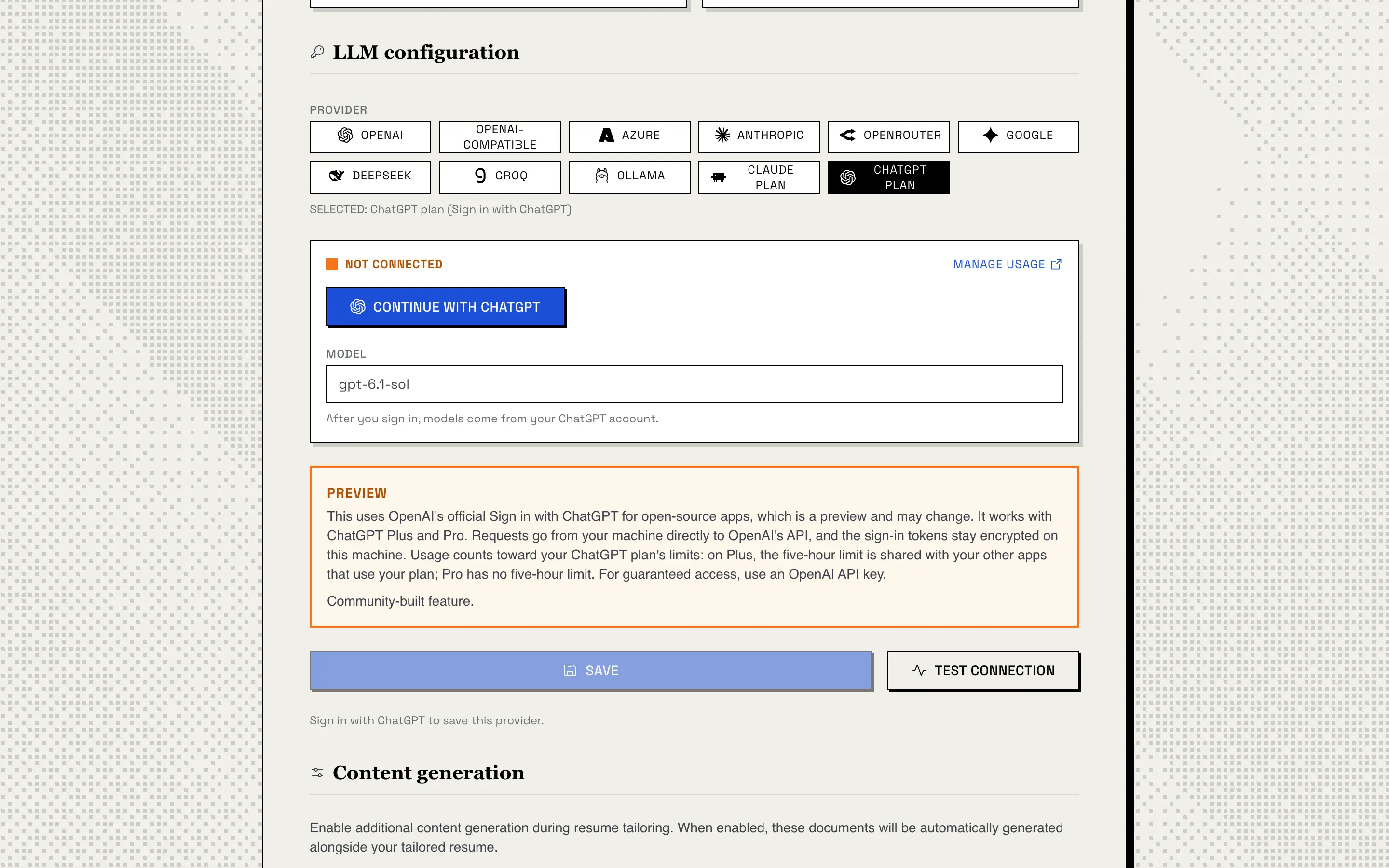
This uses OpenAI’s official Sign in with ChatGPT for open-source apps. It works with ChatGPT Plus and Pro.
- Start Resume Matcher, then open Settings in a browser on the same machine, at
http://localhost:3000. - Choose ChatGPT plan and click Continue with ChatGPT.
- Sign in at OpenAI and allow Resume Matcher to use your plan.
- Back in Settings, pick one of your account’s models and click Save.
Before you rely on it:
- It’s a preview. Sign in with ChatGPT for open-source apps is an OpenAI preview, so it may change.
- Requests go straight to OpenAI. They go from your machine directly to OpenAI’s API, and the sign-in tokens are stored encrypted on your machine.
- It counts toward your ChatGPT plan’s limits. On Plus, the five-hour limit is shared with your other apps that use your plan. Pro has no five-hour limit.
- Sign in on the same machine. OpenAI only returns the browser to
127.0.0.1, so the sign-in has to happen in a browser on the machine that runs Resume Matcher. This works with the default Docker setup, opened athttp://localhost:3000, but not from another computer or through a reverse-proxy domain.
Disconnect ends the session and deletes the tokens; Manage usage opens your ChatGPT usage settings. With environment variables, set LLM_PROVIDER=chatgpt and LLM_MODEL to a model from your account; you still sign in from Settings.
Claude Plan (via Claude Code)
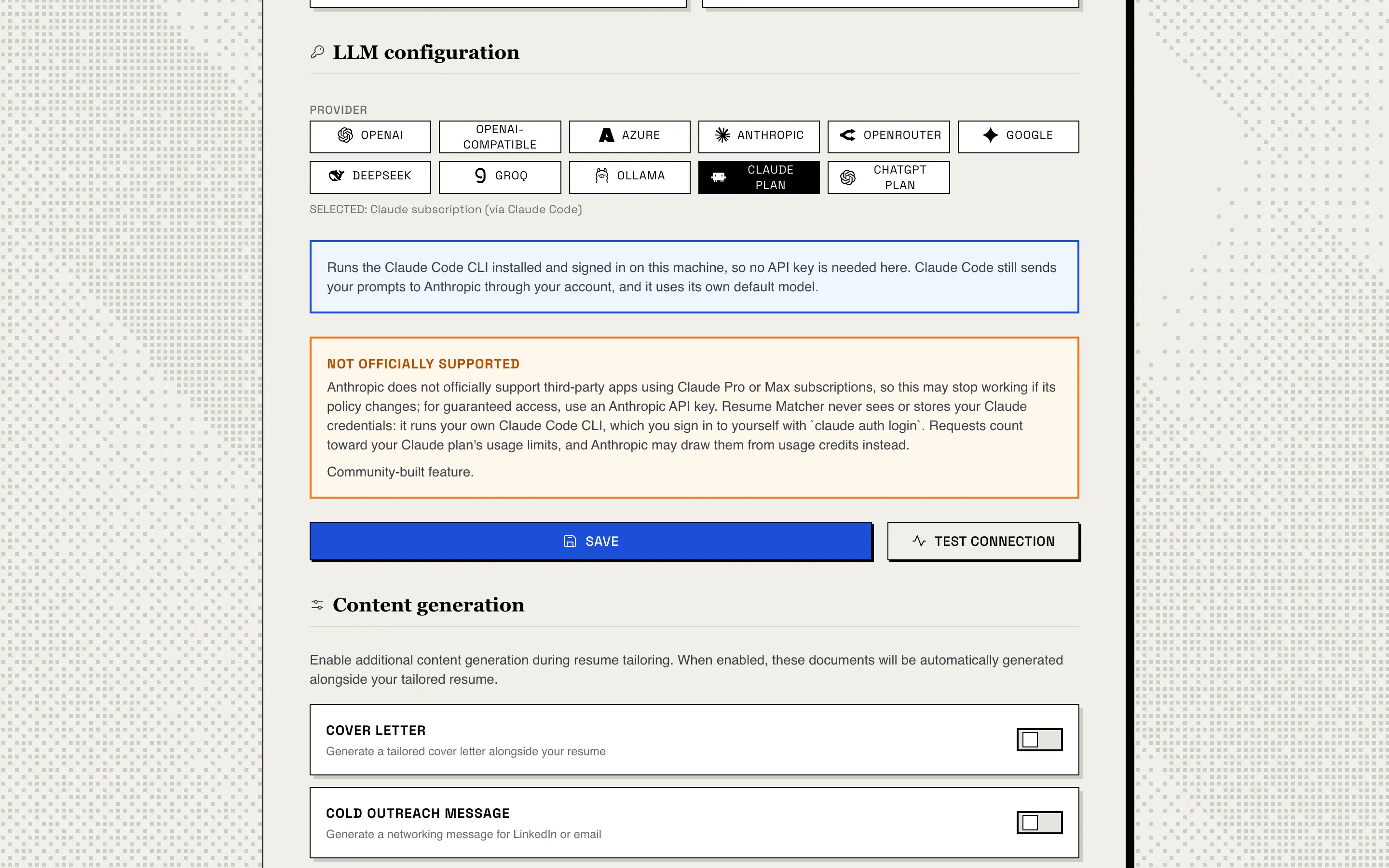
This runs your own Claude Code CLI, installed on the same machine, which you sign in to yourself:
claude auth loginThen choose Claude plan in Settings and click Save. With environment variables, set LLM_PROVIDER=claude_cli; LLM_MODEL isn’t used.
Before you rely on it:
- It isn’t officially supported. Anthropic doesn’t officially support third-party apps using Claude Pro or Max subscriptions, so this may stop working if Anthropic’s policy changes.
- Resume Matcher never sees your Claude credentials. It runs the CLI you signed in to, and stores nothing of your Claude account.
- Your prompts still go to Anthropic. Claude Code sends them through your account, using its own default model.
- It counts toward your Claude plan’s usage limits, and Anthropic may draw it from usage credits instead.
- It needs a local install. The Claude Code CLI isn’t in the Docker image, so this option doesn’t work in Docker.
Resume Matcher runs on donations.
More than 200,000 job seekers have used it, free, with no ads and no paywall. If it saved you time or helped you land an interview, sponsoring or buying a coffee keeps it that way.
Local Models
Ollama. Install it from ollama.com, pull a model, then pick Ollama in Settings:
ollama pull gemma3:4bThe default URL is http://localhost:11434. From inside Docker, use http://host.docker.internal:11434. On Linux, use the host’s IP address or start the container with --network=host.
OpenAI-compatible servers. llama.cpp, vLLM, LM Studio and any other server that speaks the OpenAI Chat Completions API work through the openai_compatible provider. Set LLM_API_BASE to the server URL and LLM_MODEL to the model the server is serving.
Slow models. Each AI request runs under one deadline, REQUEST_TIMEOUT_SECONDS (default 240, range 30 to 1800). A large model on modest hardware can run past it. Raise REQUEST_TIMEOUT_SECONDS in the backend environment and NEXT_PUBLIC_REQUEST_TIMEOUT_MS in the frontend environment (see apps/frontend/.env.sample). The frontend reads its value when it is built, so the prebuilt Docker image stays at 240 seconds. To raise it there, build the image yourself with NEXT_PUBLIC_REQUEST_TIMEOUT_MS set.
Keys and local servers. The backend never sends LLM_API_KEY to Ollama or an OpenAI-compatible server, so a paid cloud key in your .env can’t leak to a local one.
Small models. The project’s design notes warn that smaller models struggle with the structured edit format the tailoring step uses.
For the full Docker walkthrough, see Docker + Ollama.
Where Your Key Is Stored
Keys you save in Settings go into the local SQLite database, encrypted with Fernet. The encryption key lives in .secret_key in the data folder (apps/backend/data/ for a local install, the Docker volume otherwise), created with 0600 permissions so that your user account alone can read it. The backend strips keys before it writes config.json in the same folder, so the settings file never holds one.
To remove every stored key, use Clear API keys in the danger zone of the Settings page. It can’t be undone.
ChatGPT plan sign-in tokens are encrypted with the same key, in chatgpt_credentials.enc in the data folder. The Claude plan stores nothing: your Claude credentials stay with Claude Code.
LOG_LLM=DEBUG writes keys to the log in plaintext. Don’t enable it on a shared machine.
What Gets Sent to Your Provider
The app sends nothing to Resume Matcher’s authors and contains no telemetry. Your resume text, including your name and contact details, and the job description go to the provider you picked and to no one else: OpenAI for the ChatGPT plan, Anthropic through Claude Code for the Claude plan. No redaction step runs before sending. With a local model, nothing leaves your machine.
| Feature | Sent to the provider |
|---|---|
| Resume upload (parsing) | Full resume text, including name, email, phone and links |
| Job description analysis, resume title | The job description |
| Tailoring (skill plan, diff edits) | Job description plus full resume JSON |
| Keyword pass after tailoring | Tailored and master resume JSON plus the first 2,000 chars of the job description |
| Cover letter, outreach message | Full resume JSON plus job description |
| Interview prep | Resume JSON (up to 30,000 chars) plus job description (up to 12,000 chars) |
| Bullet scoring | Bullet text, job description and extracted keywords |
| Enrichment, regenerate, Resume Wizard | The resume or item plus your answers and instructions |
| Test Connection | The word “Hi” |
Your other API keys, the database file, the tracker board, settings and PDFs stay local. The one other network call is the AI library (LiteLLM) fetching a public model price list at startup; it carries none of your data and falls back to a bundled copy offline.
Cost
Resume Matcher is free and open source. A cloud provider bills your own account at its own prices for each request the app makes. The app doesn’t track that spend, so check your provider’s dashboard. With the ChatGPT or Claude plan, requests count toward your plan’s limits instead. A local model costs nothing per request.
Troubleshooting
Test Connection fails
Check the API key, or the server URL for Ollama and OpenAI-compatible servers. Save, then test again.
“Claude Code CLI not found”
Install Claude Code on the machine that runs the backend and run claude auth login. It isn’t available inside the Docker image.
“Not signed in with ChatGPT” or “isn’t available for this account”
Choose ChatGPT plan in Settings and click Continue with ChatGPT in a browser on the same machine. The plan option needs ChatGPT Plus or Pro; otherwise use an OpenAI API key.
Docker can’t reach Ollama
Use http://host.docker.internal:11434 as the Ollama URL, not localhost. On Linux, use the host’s IP address or run the container with --network=host.
Timeouts with a local model
Raise REQUEST_TIMEOUT_SECONDS (up to 1800) in the backend and NEXT_PUBLIC_REQUEST_TIMEOUT_MS in the frontend. With the prebuilt Docker image, the frontend value is fixed at build time; see Slow models above.
A .env change has no effect
Settings saved in the UI take precedence over environment variables. Open Settings and change the value there.
Next Steps
- What is Resume Matcher? for the overview
- Features for everything the AI can generate once it’s connected